Complex booking flows
In this section you can see examples for the complex booking flow.
Complex booking flows should be understood as those with an operation beyond the typical process of searching, creating the booking and confirming the booking.
Multiservice flow
The multi-service booking flow consists of booking several independent products on a single booking, so that with a single locator, we can group all the services that a client needs to contract on a single booking.
Let's imagine the case in which a user needs to book a ski pass and also the equipment rental.
With the normal booking flow, the customer would have to book and confirm the ski pass, and then book and confirm the equipment rental, generating a locator for each of the bookings.
With the multi-service booking, it is possible to add the ski pass to the booking and, on the same booking, add the equipment rental service.
At the time of confirmation, the ski pass would be confirmed in one query and the equipment hire in another query, but the two services would be confirmed in the same booking, with a single locator. Furthermore, even if the first service is confirmed correctly, the booking will not be fully confirmed until all the services in the trolley are confirmed.
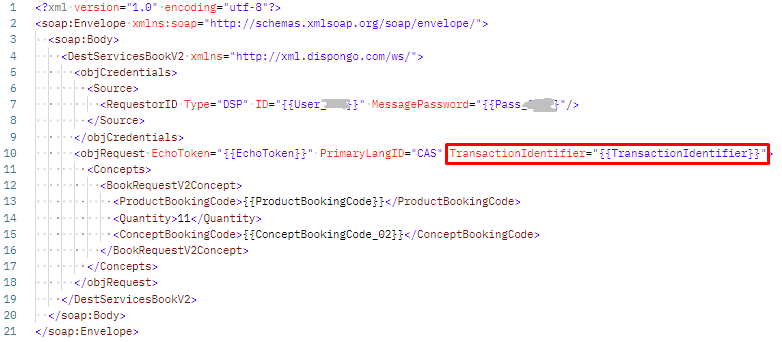
The way to carry out the multi-cart process consists of, once the first service has been added to the cart ("DestServicesBookV2"), indicating the "TransactionIdentifier" in the following services that are added to the cart, so that they are all agglutinated on the same reservation.
NOTE: You can add these services to an existing booking from other I Need Tours APIs (I Need Tours OTA API for hotels)
At the time of confirmation ("DestServicesCommitV2"), you must confirm service by service, obtaining a global status of the reservation ("ResResponseType") and a status of the confirmed service ("Status"). The global status of the reservation will be "Pending" until all services have been confirmed.
If, after all the confirmation requests have been made, the status of the booking is still "Pending", you should contact the booking department to check the status of the booking.
If the supplier returns a QR or other code for the booking, it is returned when the last service has been commited and the status of the booking is "Commited".
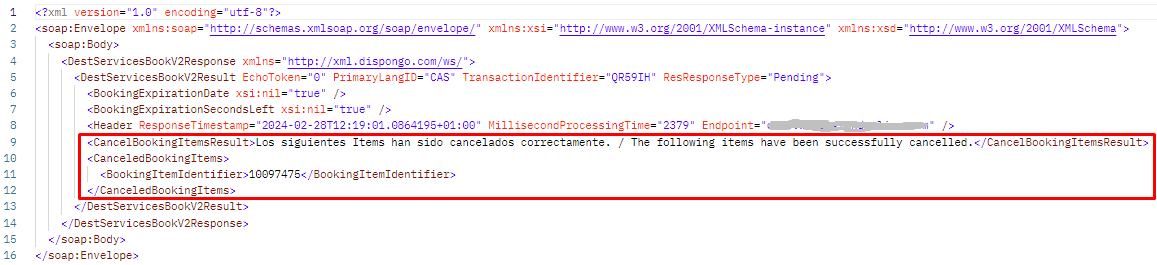
In the same way that we can add services to a reservation (before proceeding to the confirmation), we can remove previously added services, using the "DestServicesBookV2" method and sending the "CancelBookingItems" node.
The multi-service booking process has the only condition that the confirmation must be sequential (confirming a service after having finished the confirmation of the previous one), allowing the whole process to be carried out sequentially, or in parallel, as shown in the following graph.
The first flow would correspond to a typical continue shopping process by adding to cart, where the user, once a product has been selected, performs further searches to buy more products.
The second flow would correspond to a typical packaged sales process, where the customer books a product that internally contains several services, and searches are performed in parallel.
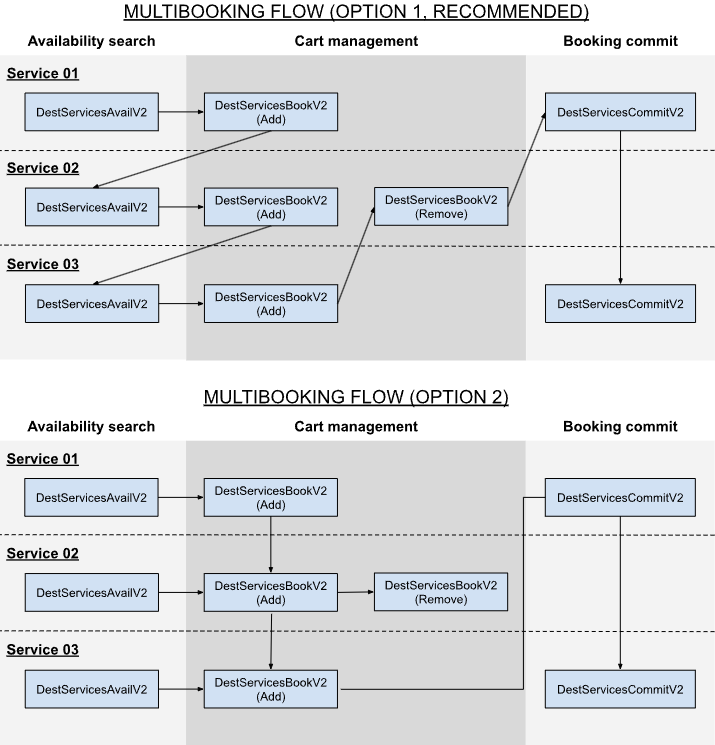
In order to work with multi-service flow, the methods must be adapted as follows:
Add to cart:
To add a service to an existing cart, we must indicate the locator of the current booking in the "TransactionIdentifier" attribute of the "DestServicesBookV2" method.
Remove from cart:
To remove a service from the existing cart, we must indicate the "BookingItemIdentifier" obtained when we add it to the cart.
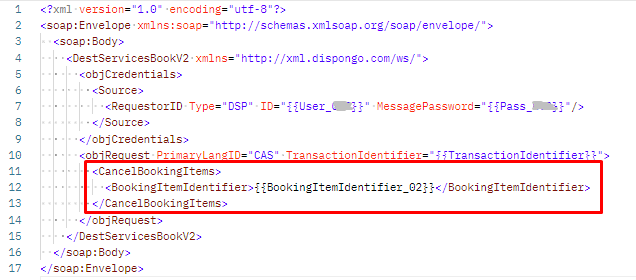
If the removal is successful, you will get a message indicating that the process has been successful and the services removed from the cart:
Commit the services:
The booking confirmation must be done service by service, so we will launch as many times the method "DestServicesCommitV2" as services we have added to the cart.
The "DestServicesCommitV2" method is launched with the same fields and structure as in the normal process, with the only difference that until the last of the services is confirmed, the status of the reservation will always be returned as "Pending" and in each of the services we must check that the status of the service is "commited".
First service:

Last service:

Cancel the services:
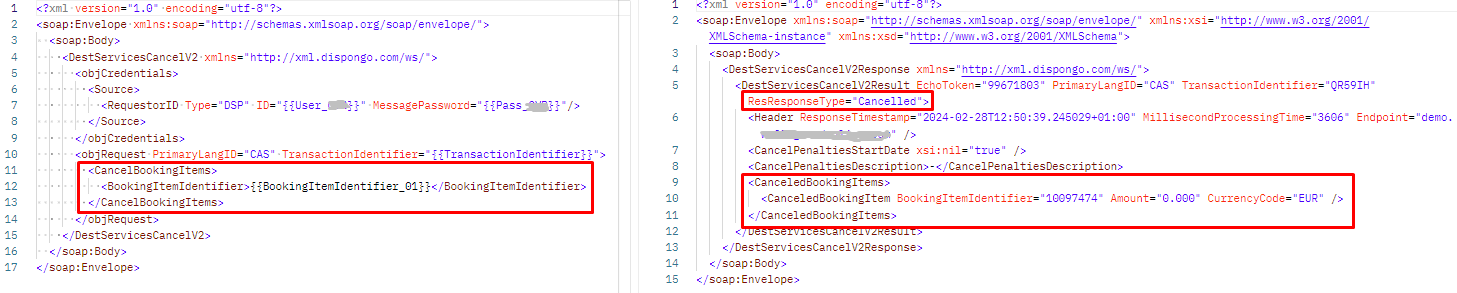
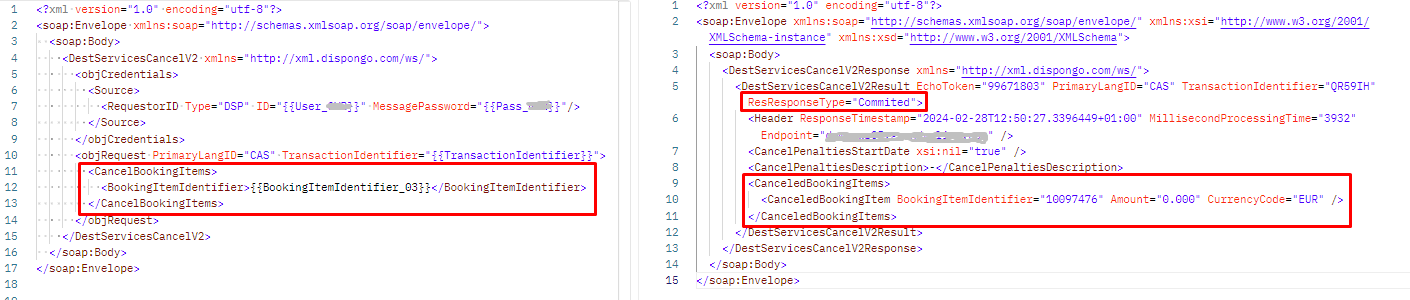
To cancel a single service in a confirmed booking, we must launch the method "DestServicesCancelV2" indicating the "BookingItemIdentifier" that we obtained when adding it to the cart. By cancelling the service in this way, we are not cancelling the whole booking, so the status of the booking will remain confirmed if there are more services.
When cancelling by service, the response will return a collection of the cancelled services in the query:
First service:
Last service: